AI Factory Architecture Overview
This page describes the architecture for AI infrastructure platforms that provision isolated GPU environments for multiple tenants from a shared pool of GPU infrastructure. It covers node topology, tenant isolation, networking, storage, observability, and identity. Use it as a starting point when designing your deployment, and follow the cross-references to configure each layer.
The architecture has four layers:
- Bare metal — server inventory, OS imaging, and hardware lifecycle (vMetal)
- Control Plane Cluster — the Kubernetes cluster that runs tenant cluster control planes (vCluster Platform)
- Tenant workload clusters — the isolated Kubernetes environments tenants interact with (vCluster)
- Platform services — observability, identity, storage, and networking that spans all layers
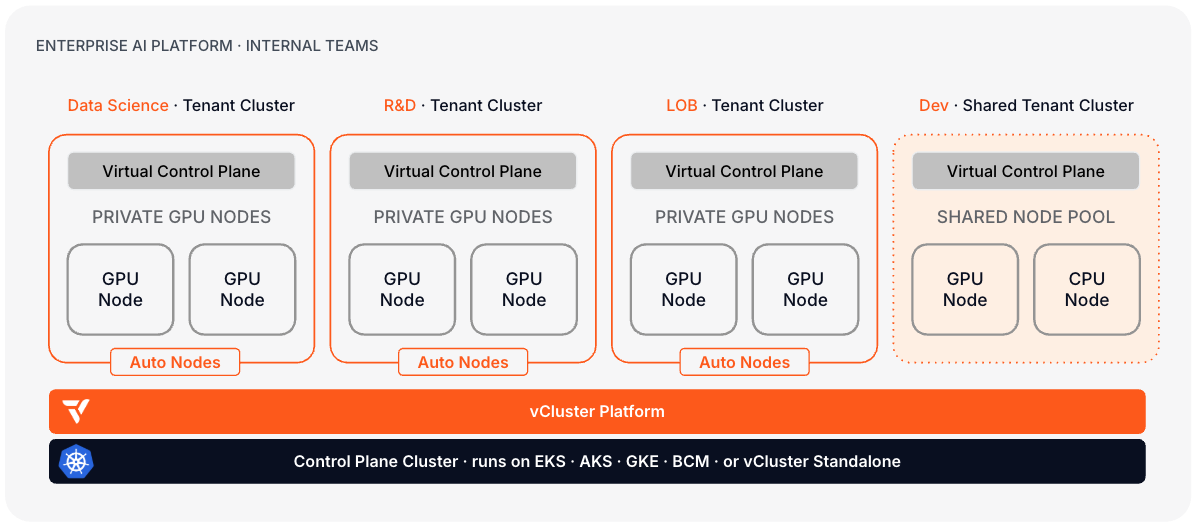
Layer 1: Bare metal
vMetal manages the full hardware lifecycle for your GPU fleet: PXE boot, OS imaging, BMC lifecycle management, and hardware inventory. When a bare metal host registers, vMetal provisions the OS, configures firmware, and makes the machine available to the node provisioner.
Node topology
- CPU nodes host the Control Plane Cluster. Typically two or three machines in HA configuration, sized for control plane pod density and platform services. These machines do not run GPU workloads.
- GPU nodes are dedicated to tenant workloads. Each tenant cluster receives its own set of GPU nodes. Tenants share no compute, memory, or hardware.
Hardware lifecycle
vMetal integrates with the Metal3 node provider in vCluster Platform. When a tenant cluster is created or a tenant scales their compute, Platform calls vMetal to provision machines from the available pool. vMetal joins them to the correct tenant cluster and reclaims them on release. See Bare metal overview for the full lifecycle model.
Layer 2: Control plane cluster
The Control Plane ClusterControl Plane ClusterThe Kubernetes cluster that hosts the virtualized control planes for tenant clusters. The Control Plane Cluster is operated by the platform provider and is completely invisible to tenants. There are no shared control plane nodes, no in-cluster agent pods, and no lateral path between tenant environments. With shared nodes, this cluster also runs tenant workloads alongside the control plane pods — the same node pool is used for both. is the Kubernetes cluster that hosts the control planes of all tenant clusters. vCluster Platform runs here and manages provisioning, access control, and lifecycle.
Control Plane Cluster options:
- vCluster Standalone — a zero-dependency Kubernetes distribution that runs directly on your CPU nodes. The natural choice when building from bare metal with no existing Kubernetes substrate.
- An existing managed Kubernetes cluster (EKS, AKS, GKE) — if you already operate a cloud cluster for platform services.
For AI cloud deployments, vCluster Standalone is the typical choice. It solves the "cluster one" problem: the platform does not depend on a third-party Kubernetes distribution and bootstraps entirely from vCluster tooling. Deploy in HA mode before taking production traffic.
Tenant cluster control planes
Each tenant clusterTenant ClusterA fully isolated Kubernetes environment provisioned for a single tenant. Each tenant cluster has its own API server, controller manager, and resource namespace, backed by a virtualized control plane hosted on a Control Plane Cluster. From the tenant's perspective it behaves exactly like a standard Kubernetes cluster. runs as a single StatefulSet pod on the Control Plane Cluster. The pod contains the Kubernetes API server, controller manager, data store, and syncer. From the tenant's perspective this is indistinguishable from a dedicated cluster. From your operations perspective, control planes are namespaced workloads you manage through Platform.
See Control plane sizing for resource recommendations at scale.
Control plane HA
In HA mode, Platform components run across multiple replicas, and high-traffic tenant control planes can be configured for additional replicas.
Control Plane Cluster quorum. Standalone HA requires at least three nodes to maintain quorum. The cluster tolerates the loss of one node without service interruption. Loss of two or more nodes requires intervention. See Standalone HA.
Tenant control plane replicas. Each tenant control plane runs as a single pod by default. For tenants with SLA requirements, configure additional replicas. See Container control plane HA.
Backing store. The default embedded SQLite store is suitable for development and small tenant clusters. For production clusters with high API write rates, use the external etcd or PostgreSQL store. See Backing store options.
Failure modes. When a tenant control plane pod is evicted or fails, Kubernetes reschedules it on another Control Plane Cluster node. The tenant's API server recovers without manual intervention. Recovery time depends on backing store replication mode and pod scheduling latency.
Layer 3: Tenant workload clusters
vCluster supports two worker node models. The choice sets the isolation level each tenant receives.
- Private nodes. Each tenant cluster runs on dedicated bare metal GPU nodes with its own CNI, CSI, and compute. No infrastructure is shared between tenants. Standard for AI cloud providers and regulated deployments. See Private Nodes.
- Shared nodes with dedicated node pools. Tenant clusters run on the Control Plane Cluster's shared node pool. Each tenant gets exclusive access to a labeled subset of nodes. CNI, CSI, and platform services are shared. Right for enterprise dev and experiment tiers. See Architecture: worker nodes.
The rest of this section covers the private nodes model in detail, as it is standard for AI cloud deployments.
Node joining and automation
Nodes join using vcluster node join with a per-tenant token. For automated provisioning at scale, configure Auto Nodes or the Metal3 node provider to have Platform drive the join and reclaim lifecycle.
See Join private nodes and Node requirements.
Control plane connectivity
Each tenant's control plane pod on the Control Plane Cluster connects to its private nodes over an encrypted VPN tunnel. This means nodes do not need to be on the same network as the Control Plane Cluster. See VPN for private nodes.
Per-tenant GPU stack
Each tenant cluster runs its own GPU stack, isolated from other tenants:
| Component | Purpose | Required |
|---|---|---|
| GPU Operator | Drives NVIDIA GPU drivers, container runtime, device plugins | Required |
| Scheduler (Kueue, Run.ai, Volcano) | Job queuing and GPU quota enforcement | Required |
| CNI (Calico or Cilium) | Per-tenant network policy and pod networking | Required |
| CSI driver | Per-tenant persistent storage | Required |
| vNode | Strong per-workload isolation at the node level | Optional |
Certified Stacks provide pre-validated configurations for GPU Operator and schedulers. Use them as the base template for new tenant clusters.
Virtual Nodes
vNode adds a strong isolation boundary between tenant workloads at the node level using Linux user namespaces and seccomp. It is not a separate deployment mode. It is an optional isolation layer that applies to any node model, including shared nodes, private nodes, and Standalone.
On shared nodes, vNode is the primary mechanism for cross-tenant workload isolation. Tenants share physical infrastructure, but each gets its own isolated node view. On private nodes, the value shifts to intra-tenant protection. vNode contains privileged workloads, agentic code execution, and root access within the tenant's own nodes, preventing node escape.
Isolation mechanics. vNode enforces boundaries at the Linux kernel level:
- UID remapping. Root inside the container (UID 0) maps to an unprivileged host user (UID 100000+). A container escape does not yield host root.
- Namespace isolation. Each workload gets its own PID, network, mount, UTS, and IPC namespace. Processes in one workload cannot see or signal processes in another.
- seccomp enforcement. A seccomp profile restricts the syscall surface. Syscalls required by the workload are explicitly allowlisted; the rest are blocked.
- CDI-based GPU passthrough. The Container Device Interface delivers direct GPU access without requiring privileged mode or host-level device exposure.
Enable vNode by setting sync.toHost.pods.runtimeClassName: vnode in the cluster template.
vNode is recommended when:
- Tenants run agentic or dynamic code execution workloads
- Tenants need root access inside containers without the risk of node escape
- Workloads use GPU access through CDI (Container Device Interface)
- Multiple tenants share physical nodes and require strong workload boundaries
See Virtual Nodes and the vNode documentation.
Layer 4: Platform services
Network isolation
Traffic paths. Three distinct traffic paths exist in this architecture:
- Tenant API traffic. Tenant users reach the tenant API server pod on the Control Plane Cluster over TLS. Platform issues per-tenant kubeconfigs scoped to that endpoint.
- Control plane to node traffic. The tenant API server communicates with kubelets and the CNI on private GPU nodes over an encrypted VPN tunnel. GPU nodes do not need L3 reachability to the Control Plane Cluster.
- Pod-to-pod traffic. Within the tenant cluster, the tenant's CNI manages pod networking and NetworkPolicy enforcement.
East-west isolation. On private nodes, each tenant cluster installs its own CNI and each private node belongs to exactly one tenant cluster. There is no L2 or L3 adjacency between tenant node pools. Netris enforces this at the switch layer with per-tenant VLAN or VXLAN segments.
CNI selection. Each private-node tenant cluster installs its own CNI during node join. Calico and Cilium are the common choices. The CNI governs pod-to-pod networking, NetworkPolicy enforcement, and load balancer integration within the tenant cluster.
Netris for L2/L3 and InfiniBand isolation. On bare metal, Netris provides switch-level VLAN and VXLAN isolation between tenant networks. Each tenant cluster gets an exclusive network segment at the switch layer, eliminating any L2 adjacency between tenants. For InfiniBand workloads requiring NCCL, Netris manages IB subnet partitioning so each tenant's training jobs run on a dedicated partition with full fabric bandwidth. For RoCE deployments, Netris applies per-tenant VLAN or VXLAN segments with QoS policies that prevent one tenant's traffic from affecting another's.
See Netris integration and Bare Metal (Netris).
Storage
Each tenant cluster mounts its own CSI driver. The driver runs inside the tenant cluster namespace and has no visibility into other tenants' volumes or StorageClasses.
Common storage backends:
| Backend | Use case | Notes |
|---|---|---|
| Rook-Ceph | Distributed block storage on the tenant's own nodes | No external dependency; requires spare capacity on GPU nodes |
| NFS | Shared file storage accessible across tenant nodes | Simple to provision; latency-sensitive for checkpoint-heavy workloads |
| Weka | High-performance parallel file system | Optimized for AI/ML checkpoint and dataset I/O at scale |
| Longhorn | Lightweight replicated block storage | Well suited for dev and experiment tiers |
| Cloud-native CSI (such as EBS or Azure Disk) | Managed cloud block storage | Available when GPU nodes run on cloud infrastructure |
- Sync StorageClasses from the Control Plane Cluster into tenant clusters. See Storage Classes sync.
- Sync CSI driver metadata. See CSI nodes and CSI drivers.
- Set up volume snapshots for tenant backup. See Volume snapshots.
For tenant data durability, configure the backing store for each control plane. See Backing store options.
Observability
Prometheus and Grafana. Each tenant cluster exposes a ServiceMonitor that Platform's Prometheus instance scrapes. Grafana dashboards provide per-tenant cluster visibility. See Aggregating metrics and Fleet monitoring (OpenTelemetry).
OpenCost. OpenCost provides per-tenant cost attribution across GPU, CPU, and memory. This enables chargeback and quota enforcement. See Cost control.
Audit logging. Every API call against Platform and tenant cluster control planes is logged. See Audit logging.
Identity and access
SSO. Connect vCluster Platform to your corporate identity provider using OIDC or SAML. All human access to Platform and tenant clusters flows through the IdP. See SSO configuration.
Authentication flow. When a tenant user authenticates:
- The browser redirects to the corporate IdP.
- The IdP issues an identity token.
- Platform validates the token and maps the identity to a team and project.
- Platform issues a scoped kubeconfig for the tenant's cluster.
- API calls hit the tenant control plane pod. The kube-apiserver validates tokens against the same OIDC issuer.
Project-scoped RBAC. Platform organizes tenant clusters into projects. RBAC is scoped to the project boundary. Tenants can only see clusters within their project. Within a tenant cluster, RBAC bindings control access to namespaces and resources. Templates enforce default RBAC policies so every tenant cluster starts with a known permission set. See Users and permissions and Projects.
Cluster access control. Platform issues tenant kubeconfigs scoped to the tenant cluster. Tenants cannot reach the Control Plane Cluster, other tenant clusters, or platform internals. See Access control.
Cluster sizing
These configurations are starting points. Actual sizing depends on tenant count, workload characteristics, control plane fanout, and checkpoint I/O patterns.
| Tier | Control Plane Cluster | Tenant cluster count |
|---|---|---|
| Small | 3 nodes | Up to 10 tenant clusters |
| Medium | 3 nodes (larger instances) | 10–50 tenant clusters |
| Large | 5+ nodes | 50–200+ tenant clusters |
GPU nodes. GPU node counts are driven entirely by tenant workload requirements. Control Plane Cluster nodes are CPU-only; no GPU workloads run on control plane nodes.
Control plane pod density. Platform schedules one control plane pod per tenant cluster. Pod resource requirements grow with tenant activity, CRD count, and API request rate. See Control plane sizing for per-pod recommendations.
Scaling. Scale the Control Plane Cluster vertically before adding nodes. For large deployments, distribute control plane load across multiple regions. See Platform HA and Multi-region Platform.
Architecture decisions summary
| Layer | Decision | Options | Required | Guidance |
|---|---|---|---|---|
| Bare metal | Machine lifecycle | vMetal (recommended) or manual join | No | vMetal docs, Metal3 node provider |
| Control Plane Cluster | Foundation | vCluster Standalone or managed Kubernetes | Yes | Standalone, Architecture |
| Tenant isolation | Node model | Private nodes (standard for AI cloud) | Yes | Private Nodes |
| Workload isolation | Runtime layer | vNode (optional, recommended for untrusted) | No | vNode docs |
| Networking | L2/L3 isolation | Netris (bare metal) or cloud VPC | No | Netris integration |
| GPU stack | Scheduler | Kueue, Run.ai, or Volcano | Yes | Certified Stacks |
| Observability | Metrics | Prometheus + OpenCost + Grafana | Yes | Monitoring overview |
| Identity | Auth | OIDC / SAML through Platform SSO | Yes | SSO configuration |
Use cases on this architecture
The four-layer stack supports different platform types. The layers themselves stay the same. What changes is tenant isolation model, workload runtime, and compliance posture.
| Use case | Node model | vNode | Key additions | Production guide |
|---|---|---|---|---|
| AI Cloud: Managed Kubernetes Service | Private nodes per customer | Recommended for privileged/agentic workloads | Customer-facing provisioning API, vBilling, Certified Stacks | AI Cloud |
| Enterprise AI Factory | Mixed: private for production ML, shared for dev/experiment | Recommended for untrusted code execution | Corporate SSO, chargeback through OpenCost, self-service portal | Enterprise AI Factory |
| Sovereign AI Cloud | Private nodes per customer | Required for regulated or multi-tenant isolation | Netris for hard network isolation, air-gap support, per-tenant audit trails, compliance governance profiles | AI Cloud |
| Agentic workloads | Private or shared nodes | Required | vNode UID remapping, seccomp profiles, CDI for GPU passthrough | vNode docs |
Sovereign AI clouds
Sovereign deployments add compliance requirements on top of the baseline architecture. The stack is identical. The additions are:
- Hard network isolation at the switch layer using Netris VLAN/VXLAN and IB subnet partitioning. See Netris integration.
- Air-gap support. vCluster Standalone and the full platform operate without external network dependencies. Certified Stacks can be mirrored to a private registry.
- Per-tenant audit trails. Every API call against Platform and tenant cluster control planes is logged. See Audit logging.
- Custom governance profiles. Per-project policies enforce data residency and tenant separation at provisioning time. See Projects and Quotas.
Agentic workloads
Agentic workloads require root access, dynamic package installation, and arbitrary code execution. vNode provides the isolation boundary that makes this safe on shared or dedicated GPU nodes:
- UID remapping maps root inside the container (UID 0) to an unprivileged host user (UID 100000+). Container escapes do not yield host root.
- Namespace isolation gives each agent its own PID, network, and mount namespace. No cross-agent visibility.
- Capability scoping confines privileged Linux capabilities to the container's namespace.
- Direct GPU passthrough using CDI delivers native GPU performance without VM overhead.
See vNode documentation for security validation results and configuration.
Next steps
- AI Cloud: Managed Kubernetes Service — Day 0, Day 1, and Day 2 path for building a managed GPU service on this architecture
- Enterprise AI Factory — Day 0, Day 1, and Day 2 path for an internal AI platform
- Architecture — control plane deployment options and worker node models
- Building a GPU cloud platform — how vCluster fits into your platform and which node model to choose
- Private Nodes — deploy dedicated GPU infrastructure per tenant
- vMetal — machine provisioning and lifecycle management for bare metal
- vNode — workload isolation layer for GPU tenants